I enjoy building applications, but getting an application to run is only part of the journey. How do we keep it running when a container fails? How do we run more copies when demand grows? And how do we deploy an update without replacing each copy by hand?
These questions are taking me into DevOps, MLOps, and AIOps: broadly, the practices and tools used to operate software, machine learning systems, and IT environments. One technology that appears often in these conversations is Kubernetes.
In this series, I plan to start with the fundamentals, explore managed Kubernetes across cloud providers, and then go deeper into Azure Kubernetes Service (AKS). Eventually, I want to understand how to deploy and secure GenAI and agentic applications—including their identities, tools, and communication.
For lesson one, though, let’s start with a simpler question: what does Kubernetes actually do?
The problem: my application works, but who keeps it running?
Imagine I build a document question-answering application. It has a FastAPI backend, a retrieval component that finds relevant documents, and a connection to a language model. I package the backend as a container image and run it on my laptop.
That works for a demonstration. But if people start relying on the application, I need answers to questions like these:
- What if the backend container stops?
- What if I need three copies of the backend instead of one?
- How do I distribute those copies across machines?
- How do I roll out a new version of the application?
- How does another component find the backend if its address changes?
I could handle some of these tasks manually. As the number of applications and machines grows, however, manual management becomes harder. Kubernetes helps automate the deployment and management of containerized workloads.
Docker and Kubernetes solve different problems. Docker helps build images and run containers. Kubernetes coordinates workloads made up of containers. Kubernetes can use container runtimes such as containerd; it does not require Docker as its runtime. In this post, Docker provides the environment for a local learning tool called kind.
If containers are new to you, the Docker overview is a useful starting point. An image is the packaged template; a container is a running instance of that image.
A simple mental model
Think of a restaurant with several kitchens:
- The cluster is the overall restaurant operation.
- A node is a kitchen with limited space and equipment.
- A Pod is a work station carrying out a task.
- The control plane coordinates where work stations should be set up and checks whether the requested number exists.
This is only an analogy: real Kubernetes has more moving parts. But it helps to distinguish the machines that run work from the components that coordinate them.
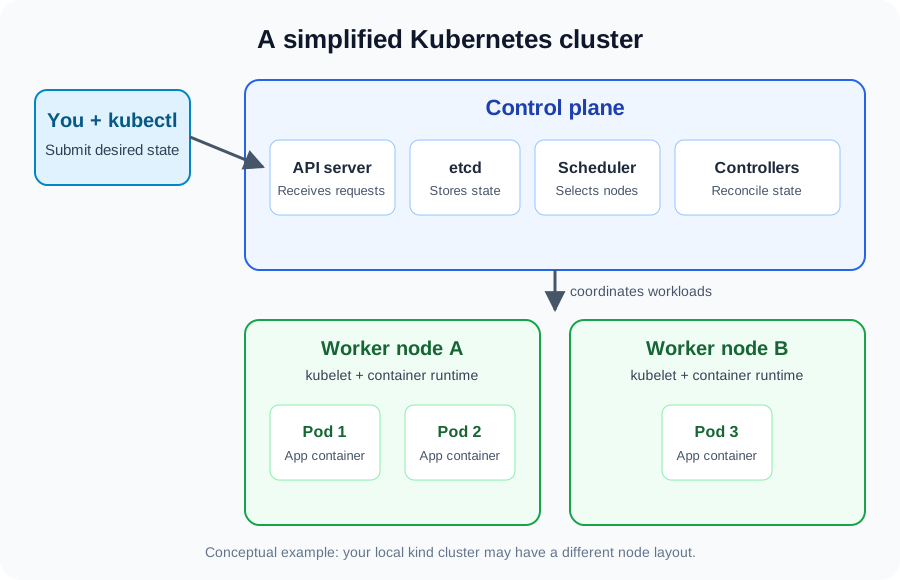
The diagram is conceptual. A local kind cluster can use a single node for both control-plane components and workloads.
Cluster, node, and Pod
A cluster consists of a control plane and one or more nodes. A node can be a physical machine or a virtual machine; in a kind cluster, a Docker container acts as a node.
A Pod is the smallest deployable unit in Kubernetes. It contains one or more closely related containers that share networking and can share storage.
For example, one Pod might run one FastAPI container. If I want three copies of the backend, I can run three Pods. The Pods are separate instances; one user’s request does not automatically create a new Pod.
Deployment and ReplicaSet
A Deployment describes how an application should run, including the container image and the desired number of replicas. It also helps manage updates to the application.
A Deployment manages a ReplicaSet, which works to maintain the requested number of Pods:
Deployment → ReplicaSet → Pods → containers
For example, if I request three backend replicas and delete one Pod, the ReplicaSet attempts to create a replacement. We will try that in the lab.
Service
A Service provides a stable network endpoint for a set of Pods. This is useful because Pods can be replaced, and a replacement may have a different IP address.
Imagine the retrieval component needs to contact the backend. Instead of remembering the IP address of a particular Pod, it can use the backend’s Service. We’ll explore Services and networking in a later lesson; the lab below uses a temporary port forward instead.
The control plane and the node
Kubernetes has several components. Here are the ones I want to remember first:
| Component | What it does |
|---|---|
| API server | Receives requests to inspect or change Kubernetes resources. |
| etcd | Stores cluster data, including the state of Kubernetes resources. |
| Scheduler | Selects a suitable node for a Pod that has not yet been assigned one. |
| Controller manager | Runs controllers that work to bring the actual state closer to the desired state. |
| Kubelet | Runs on a node and helps ensure the Pods assigned to it are running. |
| Container runtime | Runs containers on the node; containerd is one example. |
| kube-proxy | Helps implement Kubernetes Service networking. |
The first four are control-plane components; the remaining components run on nodes. For the complete picture, see the Kubernetes components documentation.
Desired state and reconciliation
Here’s the idea that makes Kubernetes click for me: instead of giving a sequence of instructions for starting each container, I can declare what I want.
For example: “Run three copies of my web application.” That is the desired state. Kubernetes controllers observe the actual state and take action when it differs.
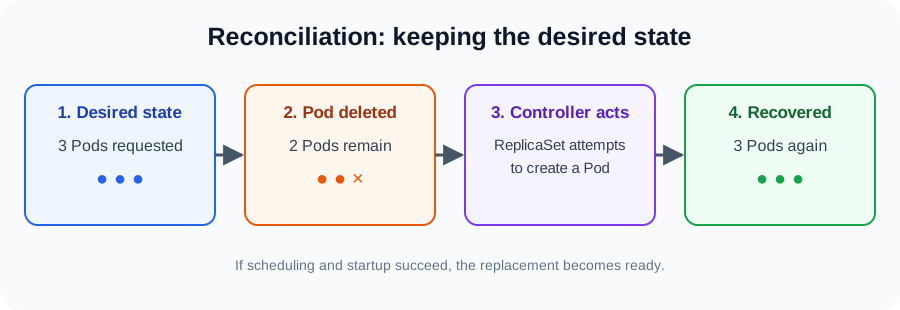
In this example, the ReplicaSet notices that only two Pods remain and attempts to create another. If a suitable node is available and the container starts successfully, the new Pod becomes ready.
This is reconciliation: an ongoing attempt to bring reality closer to the declared state. It is not a promise that Kubernetes can fix every failure. If the image cannot be downloaded or the application is broken, the replacement may not become ready. Application health checks and monitoring are separate topics.
Hands-on lab: deploy and recover a web server
Let’s use kind—short for Kubernetes in Docker—to create a local cluster. We will run Nginx, a web server, so that we can focus on Kubernetes rather than application code.
What we’ll do: create a cluster, deploy three Pods, delete one, watch a replacement appear, scale the Deployment, and access the application locally.
Prerequisites
You need Docker installed and running, plus kubectl and kind. On macOS with Homebrew:
brew install kubectl kind
For other operating systems, use the official installation guides for kubectl and kind. Check that the tools are available:
docker version
kubectl version --client
kind version
Docker must be running before kind can create the cluster.
1. Create and inspect the cluster
kind create cluster --name k8s-learning
kubectl cluster-info
kubectl get nodes
The node should eventually show Ready. Kind normally changes your current kubectl context when it creates the cluster. Check it before continuing:
kubectl config current-context
For this lab, the output should be kind-k8s-learning. If you have access to other clusters, this check helps avoid applying commands to the wrong one.
You can also inspect system Pods:
kubectl get pods -A
The -A flag shows Pods across all namespaces. A namespace is a way to group resources within a cluster.
2. Describe the application
Create a working directory and a file named nginx-deployment.yaml inside it:
mkdir -p ~/kubernetes-learning/lesson-01
cd ~/kubernetes-learning/lesson-01
Add this YAML to the file:
apiVersion: apps/v1
kind: Deployment
metadata:
  name: nginx-deployment
spec:
  replicas: 3
  selector:
    matchLabels:
      app: nginx
  template:
    metadata:
      labels:
        app: nginx
    spec:
      containers:
        - name: nginx
          image: nginx:1.27
          ports:
            - containerPort: 80
A few details matter here:
kind: Deploymentsays what type of Kubernetes resource to create.replicas: 3requests three Pods.- The selector and Pod template both use
app: nginx, allowing the Deployment to identify its Pods. image: nginx:1.27specifies the container image. This version is used for a reproducible learning example, not as a production recommendation.containerPort: 80documents the port used by the container; it does not expose the application outside the cluster.
3. Apply the configuration
kubectl apply -f nginx-deployment.yaml
kubectl rollout status deployment/nginx-deployment
kubectl get deployments
kubectl get replicasets
kubectl get pods -o wide
Once the rollout completes, you should see three Pods. Their names have generated suffixes, so yours will differ from anyone else’s.
To inspect an individual Pod, copy a name from the output and substitute it below:
kubectl describe pod <pod-name>
kubectl logs <pod-name>
The description includes details such as the assigned node, container state, and recent events. Logs help investigate what the application is doing.
4. Delete a Pod and watch what happens
First list the Pods:
kubectl get pods
Choose one name and replace <pod-name> in the next command:
kubectl delete pod <pod-name>
kubectl get pods -w
A new Pod should appear, and eventually the Deployment should have three ready Pods again. Press Ctrl+C to stop watching. You can check the rollout with:
kubectl rollout status deployment/nginx-deployment
The replacement has a new name. Kubernetes is restoring the requested number of Pods, not resurrecting the original Pod. Depending on timing, the new Pod may already exist before the watch starts.
5. Scale the application
Increase the desired count to five, then reduce it to two:
kubectl scale deployment nginx-deployment --replicas=5
kubectl get pods
kubectl scale deployment nginx-deployment --replicas=2
kubectl get pods
Give the cluster a moment to create or terminate Pods. This changes the Deployment in the cluster, but not your YAML file. Since the file still declares three replicas, applying it again will set the desired count back to three.
6. Access the application
kubectl port-forward deployment/nginx-deployment 8080:80
Open http://localhost:8080 in a browser. You should see the Nginx welcome page. Press Ctrl+C in the terminal to stop forwarding.
Port forwarding creates a temporary connection to a selected Pod; it is useful for local testing and debugging, not a substitute for a Service.
7. Clean up
When you are finished, remove the local cluster:
kind delete cluster --name k8s-learning
This deletes the named kind cluster and the resources inside it. The YAML file in your working directory remains available for later.
When things don’t work
Troubleshooting is part of learning. Before changing configuration, inspect what Kubernetes is reporting:
kubectl get pods
kubectl describe pod <pod-name>
kubectl logs <pod-name>
kubectl get events --sort-by=.metadata.creationTimestamp
| Symptom | What to investigate |
|---|---|
Pod stays Pending |
Available node resources and scheduling constraints. |
ImagePullBackOff |
Image name and tag, network access, or registry credentials. |
CrashLoopBackOff |
Application logs and startup configuration. |
| Connection refused | Whether the application is running and listening on the expected port. |
For a restarting container, kubectl logs <pod-name> --previous can show logs from its previous run. The official debugging guide covers these situations in more detail.
From local Kubernetes to the cloud
The concepts we just used—Pods, Deployments, and reconciliation—also apply to managed Kubernetes platforms:
| Cloud | Managed Kubernetes service |
|---|---|
| Microsoft Azure | Azure Kubernetes Service (AKS) |
| Amazon Web Services | Amazon EKS |
| Google Cloud | Google Kubernetes Engine (GKE) |
The Kubernetes foundations are similar, but each provider has its own integrations for identity, networking, storage, and monitoring. Managed services also involve shared operational responsibilities; they do not remove the need to secure and configure workloads.
My plan is to learn these common patterns first, then go deeper into AKS. Cloud resources can incur charges, so I will use a local cluster for the early lessons and clean up cloud resources after future experiments.
What I want to remember
- A Pod is Kubernetes’ smallest deployable unit; a Deployment commonly manages multiple Pod replicas through a ReplicaSet.
- The control plane coordinates the cluster, while nodes run workloads.
- Kubernetes works from desired state and continually tries to reconcile differences.
- A missing Pod can be replaced, but successful recovery depends on scheduling and the application starting correctly.
- A Service provides a stable way to reach a set of Pods; port forwarding is a temporary debugging and learning tool.
What’s next?
In the next lesson, I want to explore Kubernetes networking and Services: how Pods communicate, why their IP addresses can change, and how a Service gives applications a stable way to find each other. After that, I’ll work toward deploying a FastAPI application and eventually exploring AKS and secure agentic workloads.
If you’re learning alongside me, try the lab and explain this in your own words: what happens between deleting a Pod and seeing its replacement become ready?